One Record vs. a Zapier spaghetti stack
Reviewed and updated
 Product · Architecture
Almost every sales stack is held together with glue — a web of zaps and syncs shuttling data between a lead tool, a dialer, an email platform, and a CRM. It works, right up until it doesn't. And the day it doesn't, you usually find out from a lead you lost, not an error message.
What glue code is great at
Let's give it its due. Point automation — "when a row is added here, create a record there" — is genuinely useful, and tools like Zapier do it brilliantly. Zapier's own overview describes this trigger-and-action model in What is Zapier? If your need is a handful of one-directional field moves at the edges of your stack, glue is the right tool and you should use it.
Where it breaks down
A revenue motion isn't a field move. It's a single evolving story: the same person is a lead, then a conversation, then a call, then an opportunity — across four tools that each think they own the truth. Glue that together and you inherit four predictable failure modes.
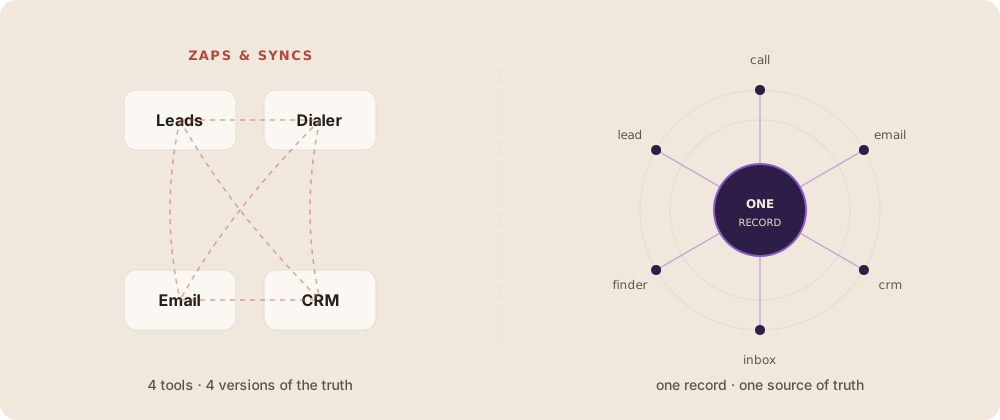
- Drift. Four systems, four slightly different versions of the customer. Which one is right? Usually nobody's sure.
- Latency. Some syncs are delayed or queued, so a supposedly real-time follow-up may arrive after the most valuable response window.
- Fragility. One renamed field or one rate limit, and a silent zap failure loses leads you never knew existed.
- No shared context. The emailer can't see what the caller just heard, because that context lives in another tool that the email step never reads.
The One Record™ alternative
Instead of copying a lead between supported Culvion workflows, keep one record for configured Voice activity and Lead Management updates. Additional modules become views of that record only when they are included and enabled for the deployment.
That can reduce duplicate entry inside the configured scope. Email, Lead Finder, Inbox and external CRM connections still require confirmed availability, permissions, mapping and reconciliation rules.
When to use which
| Decision | Point automation | One shared record |
|---|---|---|
| Best role | Connect tools at the edges | Run the core customer journey |
| Context | Pass selected fields between steps | Read and write the same customer history |
| Good fit | A small number of clear triggers and actions | Supported workflows that must share confirmed context |
This isn't "glue bad." It's "glue for edges, shared record for supported core work." Culvion's published Voice and Lead Management foundation uses One Record™ for configured call and lead activity. Other modules and external integrations are added only after their scope, permissions and reconciliation behavior are confirmed.
The takeaway: glue is a fine way to connect tools; it's a terrible way to run a motion that has to stay consistent in real time. Keep one record for the story, and reserve the zaps for the edges. Go deeper on the architecture: NATE — the suite · AI Lead Management System.